There's something wrong with the phase part of the rotary encoder section. It might be that a lot of folks have damaged chips, but it is hard to tell from afar. Need to revisit and/or revise that part, as it inhibits the counter part.
Actually, maybe we should drop the flip-flops and work with ADCs again. Then they could input data into the FPGA that way to better illustrate their use cases. For instance, we could do something to implement a filter via FPGA and send it right back out. Worth consideration.
===== Pages 588-596 =====
====== D Flip Flops: Giving Circuits Memory ======
Now, digital logic isn't all that helpful without the ability to store any data, so let's work with some basic memory circuits. There are a whole lot of variants, but we'll be starting with the [[https://en.wikipedia.org/wiki/Flip-flop_(electronics)#D_flip-flop|D flip-flop]]. This circuit is implemented with a single chip (the **SN74HCT74N**) which has four inputs (**S**et, **R**eset, **D**ata, and **>**, the Clock) and two outputs($Q$ and $\overline{Q}$), as shown below. Note that there are two flip-flops per chip.
| {{:phylabs:lab_courses:phys-226-wiki-home:lab_14_flip_flops_alt:flipflop_pinout_3x.png?300|}} | {{:phylabs:lab_courses:phys-226-wiki-home:spring2020-lab-11-flip-flops:dflipflop.png?200|}} |
| Pinout for the SN74HCT74N dual D flip-flop chip. Note that each side of pins has an independent flip-flop circuit. | Original courtesy of https://commons.wikimedia.org/wiki/User:Inductiveload |
In typical operation, the output $Q$ is the same as the last voltage seen at the data input $D$ when the clock signal ''>'' made a transition to high. Typically the other output $\overline{Q}$ is the negation of $Q$ (i.e. if $Q$ is high, $\overline{Q}$ is low).
The **S**et and **R**eset inputs are typically held high, but when they're pulled low (0V) **S** will set $Q$ high and $\overline{Q}$ low and **R** will do the opposite. This happens regardless of the clock or data inputs.
For our purposes, we're using this chip as a single bit of memory: the output $Q$ remembers the input $D$ when the clock ''>'' transitions to +5 V.
This lab will have you building the most interconnected circuit you've made all quarter. It will help to be methodical in your wiring to make it easier to follow what you've done.
[[https://docs.google.com/document/d/1bg1AzkbzpaV6AcnPZyG4gNPutH-N_LhO3v9-wrkcPns/copy|Lab Template]]
===== Flip Flop Basics =====
To start off, we'll want to rebuild our logic-level button similarly to the previous lab.
| {{:phylabs:lab_courses:phys-226-wiki-home:spring2020-lab-10-logic-gates:pull_down_resistor.png|}} |
| Logic button circuit |
Connect the button's output to the clock $\gt$ input, and one LED to the $Q$ output of the flip-flop. Finally, connect the function generator to both the other LED indicator and the $D$ input, as shown in the block diagram below:
| {{:phylabs:lab_courses:phys-226-wiki-home:lab_14_flip_flops_alt:flipflop_test_3x.png|}} |
| A circuit for saving the last clock state, controlled by a button. Note that Set and Reset should be connected to 5V for this to work at all. |
With the function generator set up to produce a slow (1Hz) **0-5V** square wave, let's try a few things
You need to change your square wave to either have a 2.5V offset, or you can directly set the min/max levels. Failure to do this will make your circuit behave unpredictably.
> Verify that the output $Q$ only changes when you press the button AND the function generator signal is the opposite of $Q$, and that it otherwise saves its state. In other words, pushing the button should set $Q$ to the function generator's state (+5V or 0).
> Use a wire to pull the $S$et input to ground, and verify that $Q$ behaves as it should
There's a decent chance some students will have issues due to improperly configuring the function generator. The most common issue is people setting the input to 1000 Hz (1kHz), instead of 1 Hz. Your eyes aren't going to be able to pick up the behavior of the circuit on a 1 ms timescale. It is understandable though, as we've mostly used signals in the kHz range thus far in the course.
It is also possible that students won't set the amplitude & offset properly, and have their LEDs either light up dimly or not at all. This is good to catch at this stage since negative voltages are not really valid inputs for logic chips, and may very well damage them.
===== Looking for Changes: Reprising the Rotary Encoder =====
Last lab we made some discrete logic circuits that would tell us the exact state that our encoder circuit was in. Using a Flip-flop we can do something else useful: generate a signal whenever an encoder output changes. By doing this we can sync the information about changes in the state of the encoder with our clock, making the information much more usable by digital systems.
To start, let's consider the circuit shown below:
| {{:phylabs:lab_courses:phys-226-wiki-home:lab_14_flip_flops_alt:flipflop_encoder_achange_3x.png|}} |
| A D-flip-flop circuit (left) used as input for an XOR logic gate (right). The eXclusive OR operation outputs high if the inputs are different and low if they are the same. |
| {{:phylabs:lab_courses:phys-226-wiki-home:lab_14_flip_flops_alt:rotary_encoder_connections_3x.png|}} |
Construct and test your circuit, verifying that the output **Q1** of the XOR circuit only changes for one clock cycle when the input changes. This might be clearest if you hook both the function generator and Q1 up to LED circuits; the Q1 LED will light up after changing the dial slightly until the next time the function generator output is high.
If people are using the scope, they should turn the time base to something on the order of 100s of ms. On a $\mu$s scale, the scope will trigger on some transition noise that occurs while the switch contacts are moving.
There may also be some slightly odd behavior here as we can change the A input before the clock changes again, toggling the output off again. In normal use we wouldn't have as much of an issue here because most applications would use a much, much faster clock (e.g. 10kHz or more). We'll fix some of these issues next week by using a pair of flip-flops to capture the inputs for two sequential times.
Next, repeat the same for the other output of the encoder:
| {{:phylabs:lab_courses:phys-226-wiki-home:lab_14_flip_flops_alt:flipflop_encoder_abchange_3x.png|}} |
==== Detecting changes ====
Now that we can detect if either A or B changes, we can take those to outputs together into another OR gate (or XOR, since we should never have both to change at once) to make a "change detected" output
| {{:phylabs:lab_courses:phys-226-wiki-home:lab_14_flip_flops_alt:flipflop_encoder_all_change_3x.png|}} |
Chain your outputs from the flip-flop circuit into another XOR gate, and verify that there are outputs on Q3 whenever either A or B change state. Since it can be hard to turn the encoder slowly enough, up your clock rate from the function generator to 10Hz or so.
If the encoder is being too temperamental for a student, it could be replaced with a pair of buttons for testing purposes. There's no need for people to deal with device idiosyncrasies if it is getting in the way of the point of the lab. They'd probably want to keep the clock slower if they did this.
===== Who's in charge here? Digital Signal Phase =====
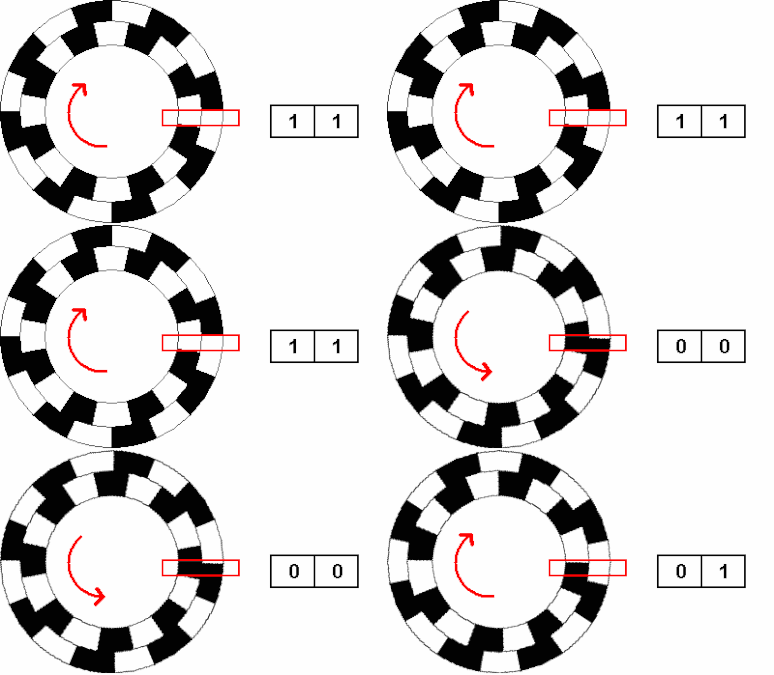
So, if A is always changing state before B, then our encoder is turning clockwise. Likewise, if B is leading A, then we're turning counterclockwise. While this is simple to put into words, it will take a bit to put it into logic circuitry.
|
|
| A visualization of a turning rotary encoder. Note that the outer ring represents A and the inner ring represents B. |
Here, we are using an eXclusive OR (XOR) gate to check if exactly one of A or B is high, and if so to output a signal. If A is leading B, then this gate will change from low to high whenever A changes state.
| t | A | B | A XOR B | |
| 0 | 0 | 0 | 0 | |
| 1 | 1 | 0 | 1 | A Changed |
| 2 | 1 | 1 | 0 | |
| 3 | 0 | 1 | 1 | A Changed |
Likewise, if B is leading A, then the gate will change from low to high whenever B changes state.
| t | A | B | A XOR B | |
| 0 | 0 | 0 | 0 | |
| 1 | 0 | 1 | 1 | B Changed |
| 2 | 1 | 1 | 0 | |
| 3 | 1 | 0 | 1 | B Changed |
| {{:phylabs:lab_courses:phys-226-wiki-home:lab_14_flip_flops_alt:flipflop_direction_poor_3x.png|}} |
Hook up your rotary encoder outputs $V_{out,A}$ and $V_{out,B}$ to an XOR gate and verify that the output **Q4** changes in sync with the signal that is leading. You may need to adjust the function generator frequency to help you observe things.
==== Using that memory ====
Now, we would like to make something that tells us both which signal is leading (for direction) at the instant that a change in state occurs. However, you may notice a problem here. Our direction indicator changes at the same time that our signal changes! If there's any delay in our circuit this could end up resulting in very unreliable behavior.
As a fix, let's consider a case where we save the state of B at a rate quick enough that it happens between changes in either B or A. We'll call the saved value B' here. Now the behavior is much more robust, resulting in the values we'd expect every time (i.e., A XOR B' is always 1 at times when a value is changing and A leads B, and always 0 at times when a value is changing and B leads A.)
| t | A | B | B' | A XOR B | A XOR B' |
| 0 | 0 | 0 | 0 | ||
| 0.5 | 0 | 0 | 0 | ||
| 1 | 1 | 0 | 0 | 1 | 1 |
| 1.5 | 1 | 0 | 0 | ||
| 2 | 1 | 1 | 0 | 0 | 1 |
| 2.5 | 1 | 1 | 1 | ||
| 3 | 0 | 1 | 1 | 1 | 1 |
| 3.5 | 0 | 1 | 1 | ||
| 4 | 0 | 0 | 1 | 0 | 1 |
Now consider the other direction:
| t | A | B | B' | A XOR B | A XOR B' |
| 0 | 0 | 0 | 0 | ||
| 0.5 | 0 | 0 | 0 | ||
| 1 | 0 | 1 | 0 | 1 | 0 |
| 1.5 | 0 | 1 | 1 | ||
| 2 | 1 | 1 | 1 | 0 | 0 |
| 2.5 | 1 | 1 | 1 | ||
| 3 | 1 | 0 | 1 | 1 | 0 |
| 3.5 | 1 | 0 | 1 | ||
| 4 | 0 | 0 | 0 | 0 | 0 |
| {{:phylabs:lab_courses:phys-226-wiki-home:lab_14_flip_flops_alt:flipflop_direction_3x.png|}} |
Test what happens for XORing A and B'
> Do they behave as expected?
Despite the length of this section, all that needs to change here is using the output of B's flip-flop circuit. This is also another situation where the slow clock might cause some odd behavior, so it might benefit people to speed up the clock and observe things on the scope or keep the slow clock and use buttons as artificial inputs.
Leave your circuit built!
====== Digital Counters ======
===== Counting back and forth: the SN74HCT191 chip =====
By counting the state changes from our rotary encoder and noting the direction, we can record how far it has been displaced from its starting point. While we could chain multiple flip-flops together to make a counter with one bit per flip-flop, that would get cumbersome quite quickly. Furthermore, a basic flip-flop counter can only count upwards. Fortunately for us, there are already purpose-made chips that do what we need! Here's the setup for a 4-bit counter, the **74HCT191**:
| {{:phylabs:lab_courses:phys-226-wiki-home:lab_14_flip_flops_alt:counter_pinout_3x.png?300|}} | {{:phylabs:lab_courses:phys-226-wiki-home:lab_14_flip_flops_alt:counter_setup_3x.png?300|}} |
| Full pinout of our 4 bit counter. | Configuration to turn your chip into an up/down binary counter. It isn't nearly as bad as you'd think! |
While this chip has quite a few features, we'll configure it to do two: count up and down in binary. Wire up the chip as shown above at right.
Using the function generator as a clock input on pin 14, (and grounding pin 5 to make the counter increase) watch each of the outputs A,B,C, and D and verify that the frequency they change at decreases by a factor of two for each one.
Instead of looking at each output on the scope, we can use LEDs as indicators here to show what's going on visually
| {{:phylabs:lab_courses:phys-226-wiki-home:lab_14_flip_flops_alt:counter_lights_3x.png|}} |
Test the counter by using a series of LEDs as outputs
Students might not be sure what's happening here if they aren't familiar with a base 2 clock. Our counter chip is acting as a 4-bit counter and can output up to 16 unique combinations of outputs. A [[https://i.stack.imgur.com/0WeoE.png|binary to decimal]] conversion might help folks understand how the thing they're seeing is a counter.
===== A Lab Cliffhangar =====
In addition to just counting upwards endlessly like a flip-flop clock, we can also count downwards with the 74HCT191. Whenever the Up/Down pin is low the chip counts up, and when it is high it will count down.
In combination with our logic that we've created for our rotary encoder, we can now build a circuit that //should// count how many fractional turns we've made from when it is initialized.
As you might have guessed, there can be issues with this setup so don't be surprised if it behaves oddly. We'll work on fixing it next week.
| {{:phylabs:lab_courses:phys-226-wiki-home:lab_14_flip_flops_alt:encoder_counter_final_3x.png|}} |
Build and test your counter by hooking up your encoder logic to the CLOCK and UP/DOWN inputs of the counter chip.
People can speed the clock up here now that we're not trying to watch state changes, 10 - 100 kHz ought to to be fine for these chips. Also, people shouldn't get too stuck on this bit; we'll be revisiting the circuit next week anyways.
Now, unless you're exceptionally lucky, it probably didn't work at all as intended. To see why, hook up your scope to the D/U and CLK (5 & 14) pins of your counter and zoom your scope in to a 500ns timescale. While some signal transitions will look nice, you'll see some here that others will have high frequency (10's of MHz) noise. Our rotary encoder does not provide as clean of a signal as our function generator, if you look at $V_{out,A}$ or B on the scope at around a 100 $\mu$s time scale you can find instances where the output changes multiple times in a row. This can be due to the mechanical contacts vibrating in the encoder, which is a hard thing to eliminate entirely. There are ways to "debounce" the signal (hello Schmitt trigger!) that could help here, but this is the end of today's lab.
While we could buy fancier chips or start chaining multiple ones together, implementing this in hardware can become tedious quickly. However, this is exactly the sort of problem that FPGAs are great at addressing, as it is straightforward to have it simulate numerous logic family chips all at once. Of course, you could also write software to read and interpret inputs to accomplish the same task. But if you either need speed (FPGAs can do some operations much quicker than an equivalently priced microcontroller) or capacity (FPGAs also tend to have many inputs that can receive data in parallel) then an FPGA might be the solution for you.
[[https://canvas.uchicago.edu/courses/64033/assignments/765102| Click here to submit your report]]